понедельник, 6 мая 2013 г.

Advanced SystemCare Personal 3.4.2


Utility for system maintenance: finding and fixing registry errors, removing junk files, facilities management startup, remove and protect against spyware and adware, optimizing system settings, remove all traces of activity on your computer and other operations.  


Free version as opposed to the Professional version has fewer features and demonstrates the banner.
Previously had the name of Advanced WindowsCare Personal.


воскресенье, 5 мая 2013 г.

Absolute Uninstaller v1.44


Very pleasant and easy to handle tool for removing programs. It highlights newly installed <Engine> and automatically cleans remaining after removal of registry keys and files. Garbage collection, however, some applications do not limited.  


You can also request a list of downloadable programs and the context menu Internet Explorer. Absolute Uninstaller has a simple user interface and completely erases all traces of the deleted computer application. How to clean your hard drive and registry entries.

download

среда, 1 мая 2013 г.

Norton Mobile Security Lite is a free anti-virus


Norton Mobile Security Lite is a free anti-virus software to protect mobile devices running on the Android operating platform.

Norton Mobile Security LITE


Norton Mobile Security LITE
Antivirus allows you to remotely lock or wipe your personal files from the phone in case of theft or loss.

NOD32 Mobile Antivirus

NOD32 Mobile Antivirus security solution for smartphones and PDAs from spam-sms, viruses, advertising, Trojans, spyware, worms, rootkits, and other malicious software.
Mobile antivirus eset NOD32 Mobile for Smartphone
Simple and intuitive user interface. NOD32 Mobile protects files, e-mail and access to all the data the user scans all processes and files that analyzes all the data received via Bluetooth, WiFi, infrared, GPRS and EDGE. Dangerous and suspicious files are placed in "quarantine".  


Мобильный антивирус eset NOD32 Mobile для смартфонов


These files can be restored if necessary, or delete. Anti filters unwanted text messages and stores them in a special folder "spam". 

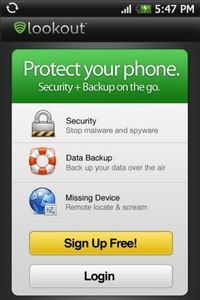
Antivirus Free Lookout for Android

Lookout is a free antivirus for devices on the mobile operating system Android. Antivirus has free and paid features. By default it runs in free mode. For free antivirus functions are primarily a protection from viruses, Trojans and other malicious software (including the ability to scan files and applications). There is a very useful free feature for finding lost or stolen phone on Google maps, even if it is turned off or the GPS module incorporating a loud call, even if the phone is in silent mode.

antivirus Lookout


антивирус Lookout


Paid Options antivirus Lookout can he borrowed for free for a trial period. To the paid features include protection for Internet surfing, remote lock and wipe data in case of theft of the smartphone, advanced backup and so on.

mobile antivirus Dr. Web Anti-Virus for Android

Dr. Web Anti-Virus for Android supports the following mobile operating systems: Android OS: 1.5/1.6/2.0/2.1/2.2.The main functions of Dr.Web anti-virus for Android:

    
Antivirus for Android checks the files "on the fly";
    
check the files received via GPRS / Infrared / Bluetooth / Wi-Fi / USB-connection or while synchronizing with a PC;


логотип android
  the existence of two types of checks: complete and selective;
    
ability to enable / disable real-time test card;


mobile Doctor Web

For the Windows Mobile operating system, a special anti-virus Doctor Web (Dr.Web), which provides antivirus protection for smartphones and PDAs from viruses and other Internet threats that target to infect mobile devices.Mobile Antivirus Doctor Web (Dr.Web) is compatible with any PDA and communicators that are running Windows Mobile 2003/2003 SE/5.0/6.0/6.1/6.5.Dr. Web antivirus for mobile devices and PDAs
антивирус доктор веб для мобильных устройств и КПК
Anti takes effect automatically when the mobile device. The fact that the monitor is running, the icon shows in the bottom of the screen.